#Parts of computer in Hindi #
यदि आप Computer से थोडा भी परिचित है तो आप जानते होंगे कि Computer कोई अकेला Part या Gadget नही है. बल्कि, Computer वह Framework है, जिसमें विभिन्न उपकरण (Parts) सामुहिक रूप से साथ मिलकर कार्य करते है |
Computer के वे Parts, जिन्हें देख तथा छू सकते है, Equipment & Hardware कहलाते है | और दूसरी तरफ Computer के वे भाग, जिन्हें देख तथा छू नही सकते है और ये वे निर्देश या प्रोग्राम होते है जो हार्डवेयर को बताते है कि क्या करना है, वे Software कहलाते है |
इस Exercise में हम Computer के कुछ मुख्य Parts को जानेगें. जिन्हे एक डेस्कटॉप कप्युटर में होना ही चाहिए. Computer इन्ही Parts से मिलकर बनता है. Computer के parts को कई श्रेणीयों में बाँटा गया है --
- Computer Case
- Information Gadgets & Input Devices
- Yield Gadgets & Output Devices
- Capacity Gadgets & Storage Devices
आइए, अब Computer Parts की प्रत्येक श्रेणी के बारे में जानते है.
1.Computer Case :-
Computer Parts मे Computer Case का अपना स्थान है. यह एक प्रकार का कंटेनर होता है, जिसमें कम्प्युटर के अनेक इलेक्ट्रॉनिक उपकरण लगे होते है, जो कम्प्युटर को बनाते है. सभी कम्प्युटरों में Framework Unit होता है. इसका आकर एक छोटे बक्से के समान होता है. इसमें मुख्यत: निम्न इलेक्ट्रोनिक उपकरण लगे होते है.
- Motherboard
- CPU
- Memory
- Power Supply Unit
CPU...
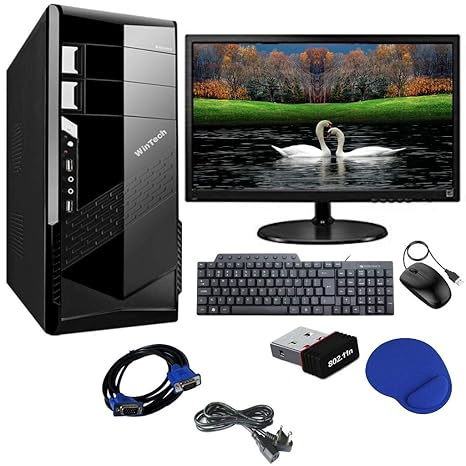
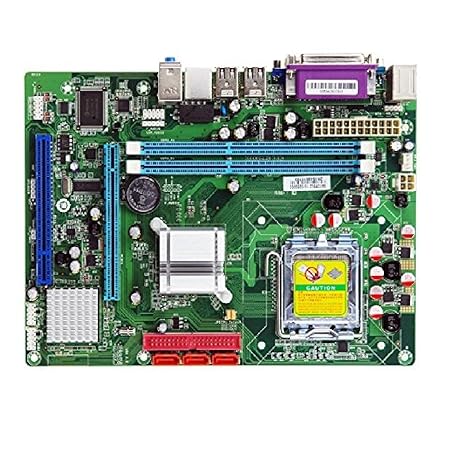
मदर बोर्ड:- All इनपुट और ऑउटपुर Devices and processor को connect करने के लिए ports बने होते है यह Computer सिस्टम का मैं पार्ट्स होता है.
CPU:-
CPU (Center processing Unit) यह कंप्यूटर का ब्रेन है। इस को सेण्टर प्रोसेसिंग एंड मैन प्रोसेसिंग डिवाइस भी कहते है। यह एलेक्ट्रॉनिसेस सर्किट्स से मिलकर बना है सभी इनपुट और आउटपुट devices से मिलकर बना है।

Memory:-
मेमोरी को अक्सर सुस्पष्ट(Short Term) और अंतर्निहित(Long Term Memory) कार्यप्रणाली के साथ सूचनात्मक प्रसंस्करण प्रणाली के रूप में समझा जाता है जो प्रोसेसर, प्रोसेसिंग का काम करती है।
Memory Short & Long Term होती है
मेमोरी को हम Permanent & Temporary memory भी कह सकते है।
१. RAM :- Short Term -temporary memory.
2.ROM/Hard Dick -Long Term -Permanent memory

Power Supply Unit & Power Supply(PSU & PS):-
एक बिजली की आपूर्ति या PSU(बिजली की आपूर्ति इकाई Power Supply unit) एक कंप्यूटर का एक हार्डवेयर घटक है जो बिजली के साथ अन्य सभी घटकों की आपूर्ति करता है। बिजली की आपूर्ति एक 110-115 या 220-230 वोल्ट AC (प्रत्यावर्ती धारा) को कंप्यूटर द्वारा उपयोग किए जाने वाले एक स्थिर कम वोल्टेज DC (प्रत्यक्ष वर्तमान) में परिवर्तित करती है और वाट्स की संख्या से उत्पन्न करती है जो इसे उत्पन्न करता है।
 Power Supply Unit...
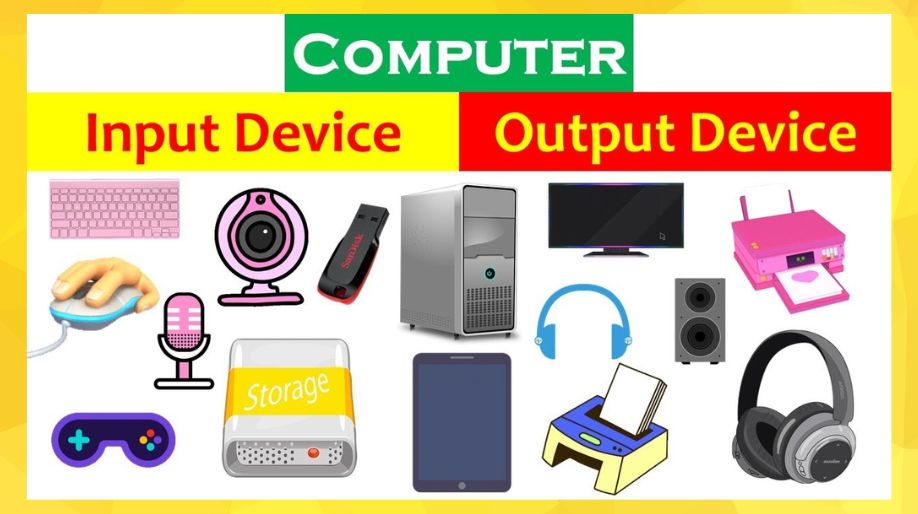
2.Input Gadgets & Input Device :-
Computer Parts के जिन उपकरणों की मदद से हम कम्प्युटर को निर्देश या आँकडे पहुँचाते है, वे उपकरण Info Gadgets & input device है | ये कई प्रकार के होते है.
- Mouse
- Console & Key Board
- Scanner
- Delight Stick & Joy Strike
- Contact Screen &Touch Screen
- Webcam
- Advanced Camera & Digital Camera etc.
3.Output Gadgets & Output Devices.:-
Information Gadgets की मदद से कम्प्युटर को जो निर्देश या आँकडे पहुँचाए जाते है, कम्प्युटर उन निर्देशों पर प्रोसेसिंग कर उपयोगकर्ता द्वारा वांछित परिणाम देता है. यह परिणाम Computer Parts के जिन उपकरणों द्वारा उपयोगकर्ता द्वारा देखा, सुना या पढ़ा जाता है. वे उपकरण Yield Gadgets & Output Devices है | ये कई प्रकार के होते है.
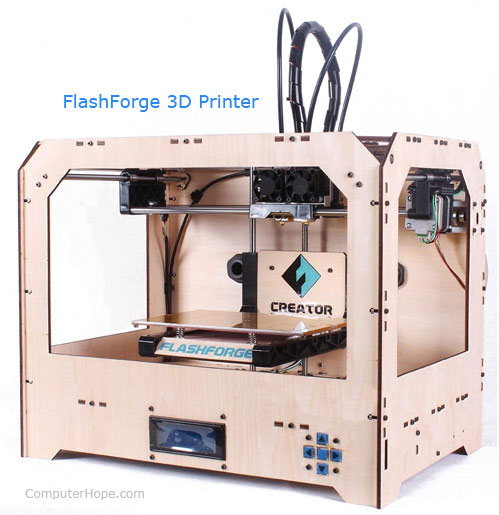
- 3D Printer
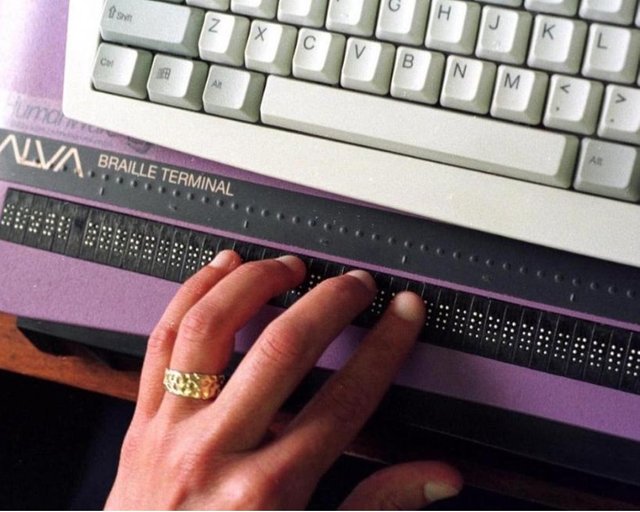
- Braille embosser
- Braille peruser
- COM (Computer Output Microfilm)
- Level board
- GPS
- Earphones
- Screen
- Plotter
- Printer (spot grid printer, inkjet printer, and laser printer).
- Projector
- Sound card
- Speakers
- SGD (Speech-creating gadget)
- Television
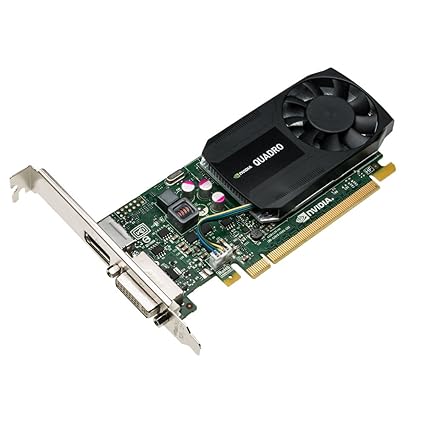
- Video card
4.Storage Gadgets & Storage Device:-
Computer Parts में Capacity Gadgets को आम भाषा में Memory के नाम से जाना जाता है. Computer Parts के ये उपकरण हमारे निर्देशों, आँकडों तथा सूचनाओ को लम्बे समय तक स्टोर करने का कार्य करते है. Capacity Gadget के मुख्यत: निम्न प्रकार है.
- Hard Plate Drive
- Floppy Plate Drive
- CD or DVD Drive
 Braille embosser
Braille peruser
Braille embosser
Braille peruser
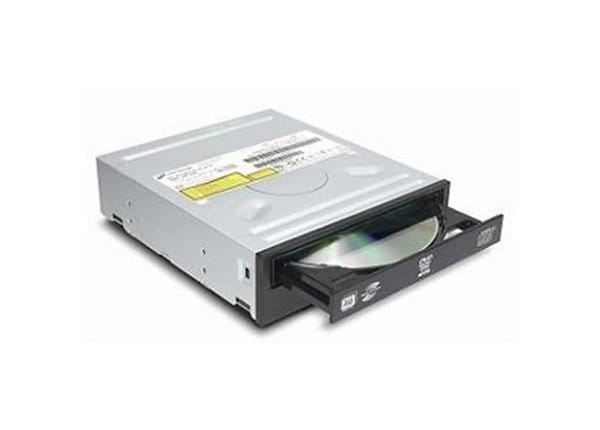 CD or DVD Drive
 Floppy Plate Drive
 Hard Plate Drive_
In English Parts of Computer.
If you are even a little familiar with computers then you would know that computer is not a single part or gadget. Rather, a computer is the framework in which the various devices (parts) work together collectively.
The parts of computer, which can be seen and touched, are called Equipment & Hardware. And on the other hand, the parts of the computer that cannot be seen and touched, and these are instructions or programs that tell the hardware what to do, they are called software.
In this exercise, we will know some of the main parts of the computer. Which should be in a desktop computer. Computer consists of these parts. Computer parts are divided into several categories -
- Computer case
- Information Gadgets & Input Devices
- Yield Gadgets & Output Devices
- Capacity Gadgets & Storage Devices
Let us now know about each category of Computer Parts.
1.Computer Case: -
Computer Case has its own place in Computer Parts. It is a type of container, which is equipped with many electronic devices of computers, which make the computer. All computers have a Framework Unit. Its shape is like a small box. It mainly consists of the following electronic devices.
- Motherboard
- CPU
- Memory
A. Mother board: - Ports are made to connect all inputs and output devices and processors. This is a part of computer system.
B. CPU: -
CPU (Center processing unit) This is the brain of the computer. It is also known as center processing and man processing device. It is made up of electrons circuits consisting of all input and output devices.
C. Memory: -
Memory is often understood as an informative processing system with a short term and built-in (long term memory) function that performs the processing of the processor.
Memory Short & Long Term
We can also call memory as Permanent & Temporary memory.
1. RAM: - Short Term -temporary memory.
2.ROM / Hard Dick -Long Term -Permanent memory.
Power Supply Unit & Power Supply (PSU & PS): -
A power supply or PSU (power supply unit Power Supply unit) is a hardware component of a computer that supplies all other components with electricity. The power supply converts a 110–115 or 220–230 volt AC (alternating current) into a steady low voltage DC (direct current) used by a computer and generates by the number of watts it generates .
2.Input Gadgets & Input Device: -
The equipment with the help of computer parts that we provide instructions or data to the computer, is the Info Gadgets & input device. There are many types of these.
- Mouse
- Console & Key Board
- Scanner
- Delight Stick & Joy Strike
- Contact Screen & Touch Screen
- Webcam
- Advanced Camera & Digital Camera etc.
3.Output Gadgets & Output Devices.:-
The instructions or data that are sent to the computer with the help of Information Gadgets, the computer processes those instructions and gives the desired result by the user. This result is viewed by the user of computer parts, devices, or read. Those devices are Yield Gadgets & Output Devices. There are many types of these.
- 3D Printer
- Braille embosser
- Braille peruser
- COM (Computer Output Microfilm)
- Level board
- GPS
- Earphones
- Screen
- Plotter
- Printer (spot grid printer, inkjet printer, and laser printer).
- Projector
- Sound card
- Speakers
- SGD (Speech-creating gadget)
- TelevisionVideo Card
4.Storage Gadgets & Storage Device: -
Capacity Gadgets in Computer Parts are known as Memory in common language. These tools of Computer Parts work for long time to store our instructions, data and information. Capacity Gadget is mainly as follows.
- Hard Plate Drive
- Floppy Plate Drive
- CD or DVD Drive
और अधिक Input Or Output Devices की जानकारी के लिए हमारी नई पोस्ट रीड करे।
Memory:-
मेमोरी को अक्सर सुस्पष्ट(Short Term) और अंतर्निहित(Long Term Memory) कार्यप्रणाली के साथ सूचनात्मक प्रसंस्करण प्रणाली के रूप में समझा जाता है जो प्रोसेसर, प्रोसेसिंग का काम करती है।
Memory Short & Long Term होती है
मेमोरी को हम Permanent & Temporary memory भी कह सकते है।
१. RAM :- Short Term -temporary memory.
2.ROM/Hard Dick -Long Term -Permanent memory
Power Supply Unit & Power Supply(PSU & PS):-
एक बिजली की आपूर्ति या PSU(बिजली की आपूर्ति इकाई Power Supply unit) एक कंप्यूटर का एक हार्डवेयर घटक है जो बिजली के साथ अन्य सभी घटकों की आपूर्ति करता है। बिजली की आपूर्ति एक 110-115 या 220-230 वोल्ट AC (प्रत्यावर्ती धारा) को कंप्यूटर द्वारा उपयोग किए जाने वाले एक स्थिर कम वोल्टेज DC (प्रत्यक्ष वर्तमान) में परिवर्तित करती है और वाट्स की संख्या से उत्पन्न करती है जो इसे उत्पन्न करता है।
- Mouse
- Console & Key Board
- Scanner
- Delight Stick & Joy Strike
- Contact Screen &Touch Screen
- Webcam
- Advanced Camera & Digital Camera etc.
- 3D Printer
- Braille embosser
- Braille peruser
- COM (Computer Output Microfilm)
- Level board
- GPS
- Earphones
- Screen
- Plotter
- Printer (spot grid printer, inkjet printer, and laser printer).
- Projector
- Sound card
- Speakers
- SGD (Speech-creating gadget)
- Television
- Video card
- Hard Plate Drive
- Floppy Plate Drive
- CD or DVD Drive
CD or DVD Drive Floppy Plate Drive
If you are even a little familiar with computers then you would know that computer is not a single part or gadget. Rather, a computer is the framework in which the various devices (parts) work together collectively.
The parts of computer, which can be seen and touched, are called Equipment & Hardware. And on the other hand, the parts of the computer that cannot be seen and touched, and these are instructions or programs that tell the hardware what to do, they are called software.
In this exercise, we will know some of the main parts of the computer. Which should be in a desktop computer. Computer consists of these parts. Computer parts are divided into several categories -
- Computer case
- Information Gadgets & Input Devices
- Yield Gadgets & Output Devices
- Capacity Gadgets & Storage Devices
Let us now know about each category of Computer Parts.
1.Computer Case: -
Computer Case has its own place in Computer Parts. It is a type of container, which is equipped with many electronic devices of computers, which make the computer. All computers have a Framework Unit. Its shape is like a small box. It mainly consists of the following electronic devices.
- Motherboard
- CPU
- Memory
A. Mother board: - Ports are made to connect all inputs and output devices and processors. This is a part of computer system.
B. CPU: -
CPU (Center processing unit) This is the brain of the computer. It is also known as center processing and man processing device. It is made up of electrons circuits consisting of all input and output devices.
C. Memory: -
Memory is often understood as an informative processing system with a short term and built-in (long term memory) function that performs the processing of the processor.
Memory Short & Long Term
We can also call memory as Permanent & Temporary memory.
1. RAM: - Short Term -temporary memory.
2.ROM / Hard Dick -Long Term -Permanent memory.
Power Supply Unit & Power Supply (PSU & PS): -
A power supply or PSU (power supply unit Power Supply unit) is a hardware component of a computer that supplies all other components with electricity. The power supply converts a 110–115 or 220–230 volt AC (alternating current) into a steady low voltage DC (direct current) used by a computer and generates by the number of watts it generates .
2.Input Gadgets & Input Device: -
The equipment with the help of computer parts that we provide instructions or data to the computer, is the Info Gadgets & input device. There are many types of these.
- Mouse
- Console & Key Board
- Scanner
- Delight Stick & Joy Strike
- Contact Screen & Touch Screen
- Webcam
- Advanced Camera & Digital Camera etc.
3.Output Gadgets & Output Devices.:-
The instructions or data that are sent to the computer with the help of Information Gadgets, the computer processes those instructions and gives the desired result by the user. This result is viewed by the user of computer parts, devices, or read. Those devices are Yield Gadgets & Output Devices. There are many types of these.
- 3D Printer
- Braille embosser
- Braille peruser
- COM (Computer Output Microfilm)
- Level board
- GPS
- Earphones
- Screen
- Plotter
- Printer (spot grid printer, inkjet printer, and laser printer).
- Projector
- Sound card
- Speakers
- SGD (Speech-creating gadget)
- TelevisionVideo Card
4.Storage Gadgets & Storage Device: -
Capacity Gadgets in Computer Parts are known as Memory in common language. These tools of Computer Parts work for long time to store our instructions, data and information. Capacity Gadget is mainly as follows.
- Hard Plate Drive
- Floppy Plate Drive
- CD or DVD Drive
और अधिक Input Or Output Devices की जानकारी के लिए हमारी नई पोस्ट रीड करे।